Build vocabulary lists, flash cards, and writing activities from any topic or text, so the words students learn actually stick.



















Build a personal list from looked up words while reading.
Practise vocabulary with flash cards or a matching quiz.
Write a sentence with a word and find out straight away if it works.
Generate and edit vocabulary lists in the time it takes to name the topic.
Save time with definitions, examples and translations pre-filled.
Assign lists to a class, and share them with other teachers.
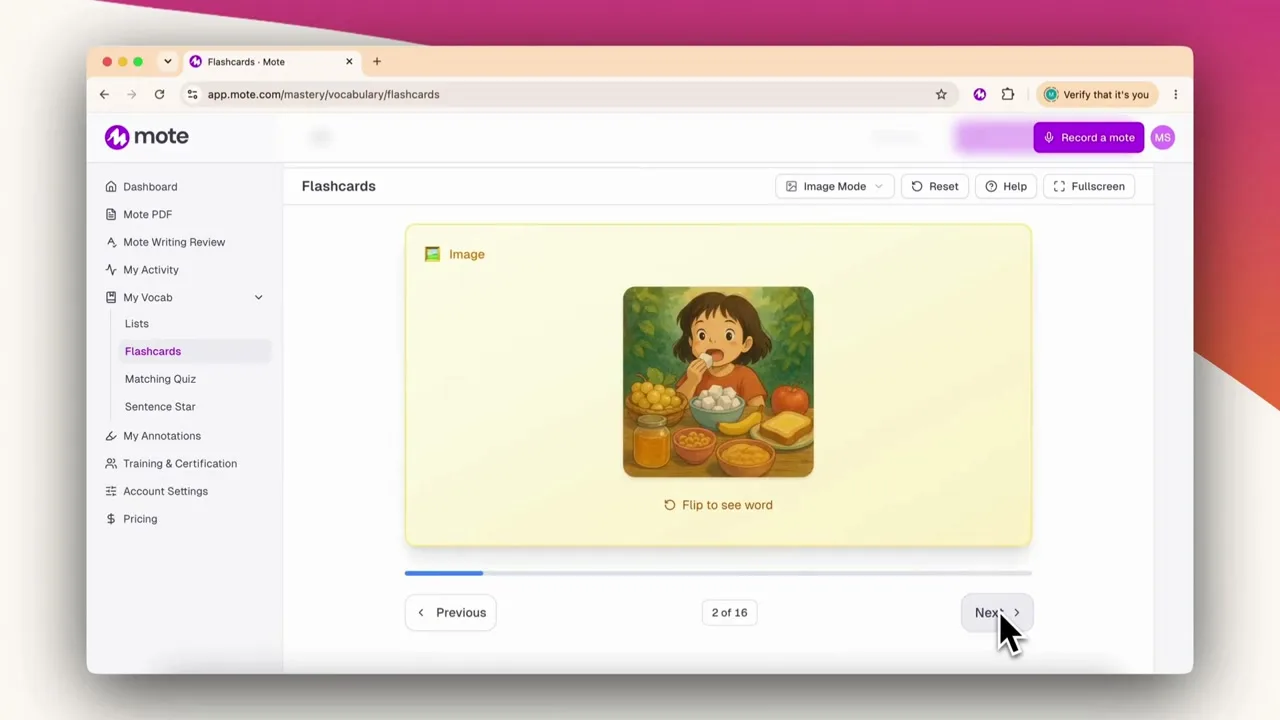
Mote Vocab turns a set of new words into practice. Name a topic, paste a passage, or bring a list you already use, and Mote creates a vocab list. Each word has a definition, an example sentence, translations, and a picture where one helps. Students can add to their lists as they read, because any word they look up can be added to their own collection. Then they practise: flash cards, a picture version for younger readers, a matching quiz, and an activity that asks them to use the word in a sentence and tells them straight away whether it works.
Name a topic and Mote builds a word list for the grade you teach.
Drop in a text and Mote pulls the words worth learning out of it.
Words a student looks up in the Dictionary land in their personal list.
Bring a list you already use and Mote fills in the rest.
Sign up, generate a list, and turn it into practice.
01
Sign up to Mote
02
Open Mote Vocab
03
Generate a list
04
Check the words
05
Assign it to your class
Create a Mote account. You can sign in with Google or ClassLink, so there is no separate password to remember.
Find it in your dashboard under My Vocab.
Name a topic, paste a passage, or bring your own words. Choose the grade level, how many words you want, and the language: English, French or Spanish.
Each word comes back with a definition, an example sentence, translations, and a picture where one helps. Change anything you do not like before students see it.
Share your vocab list with your students, so they can practise with flash cards, a matching quiz, or by writing their own sentence and getting a response straight away.
.png)

Generate one from a topic, paste in a passage and let Mote pull the words out, or bring your own list. Students also build a personal list from words they look up in the Dictionary.
Lists can be generated in English, French, or Spanish, and every word comes with translations.
Yes. Assign a list so every student practises the same words, and share it with colleagues teaching the same topic.
With flash cards, including a picture version, a matching quiz, and an activity that asks a student to use the word in their own sentence and responds straight away.